
AutoTutor Sessions — SPARC and Historical Standalone Runtime
Last Updated: 2026-10-09 | For: Teachers, content authors, experimenters, and researchers | Level: Advanced
Audience: Advanced authors and researchers. AutoTutor sessions require structured content authoring, an OpenRouter model configuration, and study/privacy review before learner use.
Student-selected SPARC move menu
The student-selected condition presents three compact columns: KC, move, and question type. Same KC is selected initially; Next KC is the alternative. Neither the move nor question type has a default. Choose Next KC first if you want to change targets: selecting both a move and question type immediately begins that move on the selected KC, without another confirmation or menu.
The move labels are Question (Q), Explain + Q, Explain + support + Q, and Explain + visual + Q. Question types are Text answer, Fill in the blank, Multiple choice, and True / false. Each column permits one choice. Other choices in that column look subdued but remain clickable until generation starts. The menu uses the active application theme and shrinks proportionally when needed to fit a phone screen without wrapping its labels. Accepted choices and generated components retain their existing retry and resume behavior.
Past choices appear as a compact, read-only row showing only the selected KC, move, and question type, using the same labels as the active menu. Existing history is reconstructed without rewriting learner records. The row has no outer selection outline, and the first history row is kept clear of the floating Progress control when the two would overlap on a narrow screen.
Multiple-choice and true/false answer buttons use compact padding. A clicked answer stays marked in the original question and is not repeated as a learner chat message, including after reload. Typed and fill-in answers still appear as learner messages. Saved answer evidence and scoring are unchanged.
Supported AutoTutor instruction
Current AutoTutor dialogue runs through sparcsession, the sparc engine, and the sparc-autotutor-v1 instructional adapter. Use Introduction to TutorScript and SPARC Instructional Cycle Specification for supported authoring and runtime behavior.
The original standalone autotutorsession engine, deterministic planner/state machine, and dedicated chat surface have been removed. Upload and launch reject that selector; it is never translated automatically into SPARC. All eight SPARC policies and their account-based effective routing remain unchanged.
Learner histories, model state, assignments, and saved SPARC decisions are retained. Historical analytics and exports can still interpret old AutoTutor records. There is no data migration or implicit content conversion.
Historical standalone guide
The remainder of this page is a preserved historical design record, not current setup or authoring instructions. Its configuration, UI, and runtime entry points are unsupported.
Historical overview
An AutoTutor session is a conversational unit configured with autotutorsession. Instead of selecting ordinary cards, MoFaCTS shows an AutoTutor chat surface where the learner answers in their own words and the tutor guides them toward authored expectations while detecting authored misconceptions.
This page covers the dedicated autotutorsession unit and its curriculum script. SPARC AutoTutor uses a SPARC document and an explicitly selected production-rule controller; its authoring contract is described in TutorScript. Both separate response evaluation, instructional decisions, and tutor wording. In the dedicated unit, the scorer supplies semantic evidence, the application planner chooses the target and move, and the utterance model realizes that selected move.
Use AutoTutor when you need:
- open-ended conceptual explanation rather than short-answer recall
- a dialogue that can ask hints, prompts, corrections, and repair questions
- researcher-visible turn history with expectation/misconception state
- a bounded conversational activity with explicit completion criteria
Do not use AutoTutor for simple flashcards, fixed pre/post tests, or video checkpoints. Use Learning Sessions, Assessment Sessions, or Video Units and Adaptive Logic for those.
Configuration Shape
AutoTutor configuration is split across the Profile, TDF, and stimulus file:
- Profile OpenRouter API key: user-owned key used by AutoTutor when present. The key is stored encrypted on the MoFaCTS server and returned to the browser for client-side OpenRouter requests.
- TDF
tutor.setspec.openRouterApiKey: provider-supplied alternate key used only when the current user has no saved Profile OpenRouter key. - TDF
tutor.setspec.openRouterModel: lesson-level model identifier. - TDF
tutor.unit[].autotutorsession: unit-level AutoTutor settings. - Stimulus
setspec.clusters[].stims[0].display.text: learner-facing opening prompt. - Stimulus
setspec.clusters[].stims[0].autoTutor: structured curriculum script.
Minimal TDF shape:
{
  "tutor": {
    "setspec": {
      "lessonname": "AutoTutor Example",
      "name": "autotutor_example",
      "stimulusfile": "AutoTutor_Example_stims.json",
      "userselect": "true",
      "openRouterModel": "openai/gpt-5.4-nano"
    },
    "unit": [
      {
        "unitname": "Concept AutoTutor",
        "autotutorsession": {
          "cluster": 0,
          "maxTurns": 20,
          "graduation": {
            "requiredExpectationCount": 3,
            "maxActiveMisconceptions": 0
          }
        }
      }
    ]
  }
}
AutoTutor Session Fields
| Field | Required? | Meaning |
|---|---|---|
cluster |
yes | Stimulus cluster whose first stim contains the opening prompt and autoTutor script. |
maxTurns |
yes | Maximum learner turns before the session ends. This is a limit, not a mastery rule. |
graduation.requiredExpectationCount |
yes | Number of required expectations that must be covered for mastery. |
graduation.maxActiveMisconceptions |
yes | Maximum active misconceptions allowed at completion. |
openRouterModel |
no | Unit-level model override. If omitted, tutor.setspec.openRouterModel is used. |
utteranceTemperature |
no | Tutor wording temperature from 0 to 2; default is 0.45. |
AutoTutor Script Fields
The first stim in the referenced cluster must include autoTutor with:
| Field | Meaning |
|---|---|
id |
Stable script identifier used for saved history consistency. |
topic |
Human-readable topic. |
learningGoal |
What the learner should be able to explain. |
idealAnswer |
Full target explanation. |
expectations |
Atomic concepts the learner should cover. |
misconceptions |
Authored misconceptions, detection cues, corrections, and repair questions. |
dialogPolicy.requiredExpectations |
Expectation IDs required for graduation. |
summary |
Final summary shown when the conversation completes. |
Each expectation should include an id, label, proposition, hints, prompts, and assertion. Each misconception should include an id, label, misconception, detectionCues, contrastWithExpectations, correction, and repairQuestion.
expectationRelationships is derived runtime data, not a lesson-package field. It is an adjacency object keyed by expectation ID; each nested key is a related expectation ID and each value is a number from 0 to 1. The ordinary AutoTutor runtime generates this graph by embedding expectations, normalizing the vectors, and computing local cosine similarities. Its existing model sequence is google/gemini-embedding-001 followed by openai/text-embedding-3-large if required by that runtime's generation path.
Package uploads reject supplied expectationRelationships, expectationRelationshipProvenance, and kcGraph.* facts. Current-package downloads omit these derived values. SPARC AutoTutor generates its KC graph during upload using google/gemini-embedding-001; failure stops upload. It never uses supplied graph values or switches models. Its internal kcGraph.node and kcGraph.relationship facts remain available to production selection and resume.
The generated graph is stored in the lesson content and shared with users of that TDF. It is not private learner inference and is not recomputed during ordinary learner turns.
expectationRelationshipProvenance records the graph version, generation timestamp, model that produced the graph, attempted models, metric, score transform, source key type (tdf or user), and cache key. It never stores the OpenRouter key.
The planner uses these stored relationships to compute:
centrality: the mean relationship strength from one expectation to the other expectationscoherence: the relationship between the current candidate expectation and the current or last covered expectationfrontier:(1 - expectation coverage) * coherence
These planner values are not scored from the learner answer. The AI scorer estimates learner coverage and misconception state; traversal comes from the embedding-generated relationship graph. The stored expectationRelationships matrix is the auditable runtime contract.
Once the planner selects an instructional target, that expectation or misconception remains the active focus until it reaches its release criterion. An expectation is released when its coverage reaches the configured coverage threshold. A misconception is released when its support falls below 1 - coverageThreshold (for a coverage threshold of 0.8, support must fall below 0.2). Prompts, hints, assertions, and corrections address only that active target; graph priority is used to choose the next target after the current focus is released, not to switch among unfinished targets.
The progressive scaffold moves from pump to prompt to hint to assertion when the learner does not make progress. A pump names the active concept in learner-facing language and then invites open elaboration within that concept. Assertion is the bottom-out stage: while the target remains unresolved, subsequent turns remain assertions with direct content and focused uptake checks instead of cycling back to a pump. Reaching the target criterion releases the focus and starts the next target at its normal opening stage.
Runtime Behavior
AutoTutor uses a dedicated chat surface. The runtime:
- loads the opening prompt and structured script from the configured cluster
- scores each learner answer against authored expectations and misconceptions
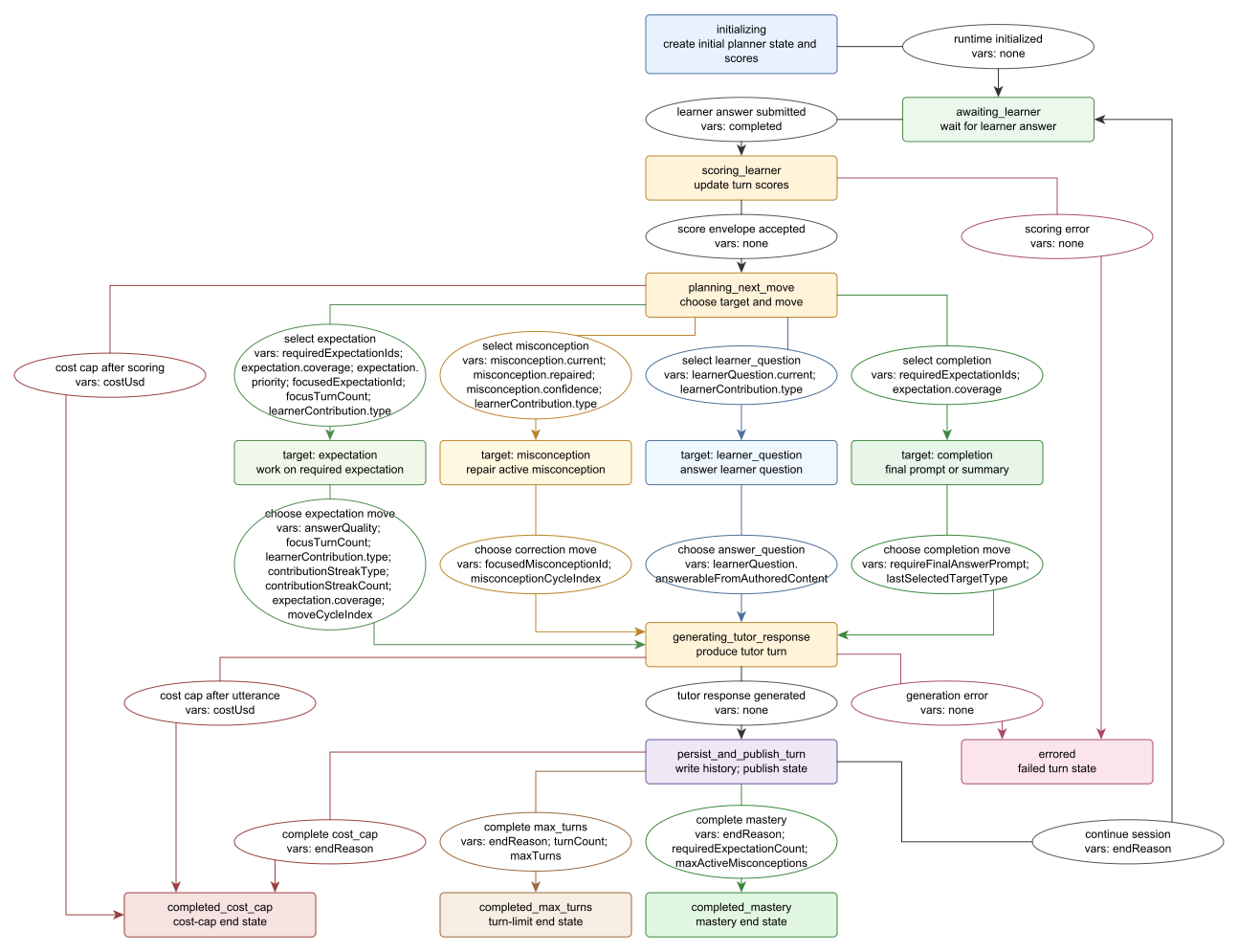
- chooses a tutor move such as hint, prompt, assertion, correction, answer-question, or summary
- writes each turn through the canonical history path with
eventType: "autotutor-turn" - resumes from saved AutoTutor history for the same user, TDF, unit, and script ID
Completion can end by mastery, maximum turns, or the runtime cost cap. Saved history must match the current script, end-state flags, operational phase, pedagogical state, and transition shape; otherwise AutoTutor fails clearly rather than continuing with mismatched state.
Runtime State Map
The map below summarizes the AutoTutor runtime state transitions and the control variables that determine learner-turn routing, target selection, completion, and end-state resolution.
Data and Research Notes
AutoTutor history rows include learner text, tutor response text, turn timing, unit context, and an AutoTutor note in CFNote with state/progress metadata. Researchers should treat AutoTutor data as open-ended text data and review Data Privacy, IRB, and FERPA Notes before collecting identifiable responses.
For exports and analysis, also see:
Citation diagnostics
If the AI cites a nonempty quotation with the wrong conversation reference (including a tutor or missing history entry), or wording that does not exactly match the referenced learner statement, AutoTutor continues using the otherwise valid score unchanged. Administrators can inspect these events under Admin Tests → Recoverable system warnings. The quotation and reference remain unverified and are not automatically corrected. Citation format, evaluation direction, and score validation remain in place. The warning log stores counts and lesson references, not student answers or quoted text.
For citation troubleshooting, enable client logging at verbosity level 1. Citation diagnostics contain source/index validity, speaker and match counts, quote length, and bounded matching indices. They omit the quotation, learner answer and conversation wording. Persisted Admin Tests warnings retain their existing count and lesson reference. These diagnostics do not change validation or scoring behavior.
SPARC response-size recovery
When a generated SPARC response exceeds a text limit, SPARC requests one shorter, complete response using the same selected teaching action. It validates the replacement before saving or displaying it. It does not cut off text or change the student's assessment. If the second response also exceeds a limit, an inline Try again control resumes the pending instruction while retaining accepted work. The student does not need to answer the question again. Other validation and service failures keep their existing handling.
Administrators can inspect these events in Admin Tests → Recoverable system warnings (/admin/tests). The autotutor.outputLimit entries show the operation, affected field, size and limit, attempts, and whether regeneration succeeded, needs a student retry, or encountered another error. These records contain no student answers or generated conversation text. Logging is best effort and cannot interrupt a lesson. Each automatic regeneration can incur one additional model call; choosing Try again starts another bounded attempt.
Operational Validation
- Validate that the user has a Profile OpenRouter key or the TDF has
tutor.setspec.openRouterApiKey, and that the TDF has an effectiveopenRouterModel. - Validate the referenced cluster exists and its first stim has
display.textandautoTutor. - Check every
expectationRelationshipssource and target ID references an authored expectation and every value is from0to1. - Check
graduation.requiredExpectationCountdoes not exceeddialogPolicy.requiredExpectations. - Check
graduation.maxActiveMisconceptionsdoes not exceed authored misconceptions. - Run a short learner test and confirm AutoTutor turn rows appear in Data Output.